 Resale Record
Schedule C export
See every Schedule C line for the year, check hobby-loss risk and export a PDF or CSV your tax preparer can work from.
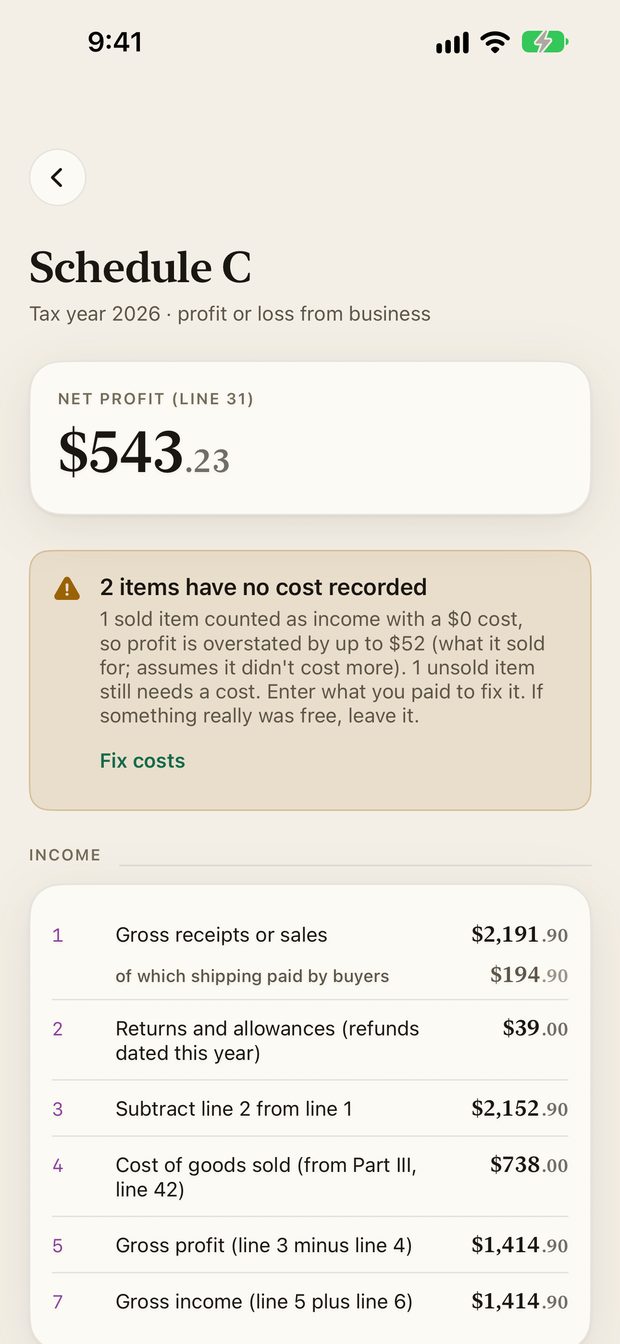
Schedule C is the form most resellers use to report profit or loss from their business. The Schedule C screen shows each line for the year, built from your sales, costs, expenses and mileage.
What you see#
- Net profit (line 31) at the top.
- Income lines: gross receipts, returns and allowances (refunds), cost of goods sold, gross profit and gross income.
- Expense lines, with your recorded expenses mapped to them.
- A check for hobby-loss risk.
If some sold items have no cost recorded, a card tells you how far off the numbers could be. Use Fix costs to correct it. See Books overview.
Export#
Export the year as a PDF or CSV, email it, or save it, and give it to your tax preparer. Open it from Books or Settings, Schedule C export.
Taxes are yours to file#
Resale Record helps you keep records and prepare an export. It does not file anything for you, and it is not a substitute for a tax professional.
To understand the form first, read Schedule C for resellers and Export a Schedule C summary for your tax preparer.
Something missing or out of date? Email [email protected] and tell us what you expected to see.